Today due to low cost smartphone are hitting the market every single day, every all
is able to have a smart phone, and the most popular mobile phone companies to providelow cost quality mobile phone are Samsung,Micromax,MI,Lava,Karbon,ViVo,parasonic,Sony,HTC
and any more!!

But what to do when we forget our mobile phone pattern lock????
Android Smart phones have many features which attracts consumers and give them a variety of apps
to enjoy and increase productivity.One for many, pattern locking feature provided on
these kind of android phones give very easy graphical locking (Pattern Locking) which help
so many peoples for not remembering any typical alphanumerical password but to easily remember
graphical pattern for their lock!
These pattern locking required five and above dots to combined formed a pattern on our
mobile screen.
but what happens when some of us have forget pattern we have chosen for locking our mobile
phone??
there are many people searches on google for "How to unlock android phone pattern lock without losing data "
...... People search new ways to remove pattern lock without losing data.
we don't want to Lose the precious data that can be stored on our mobile phone like pictures,movies,family
photo etc which tends difficult to face and is something which we like to avoid.
NOTE: TO performed below pattern unlocking method your Mobile must be have USB Debugging Mode Enabled.
Follow the below given steps to bypass android pattern lock without losing data:
Requirements:
1. Download and install Android SDK Tools from Link. It is important to run ADB commands.
2. Select the package as per your platform(android version). It is available for Windows, Linux and Mac OS X

3. Now open it and check only Android SDK Platform Tools. Uncheck other packages and click on install packages.
4. One more important thing is that your android mobile should have USB debugging enabled. If its not then this trick will not work on that device.
5. you must install your android Mobile device compatible drivers.(Just Google for your mobile driver)
Procedure To Unlock Android Password Without Losing Data:
1. Connect your locked android mobile device with your PCor computer or laptop via USB.
2. Open folder where you installed Android SDK Tools Users > App Data > Local > Android > Android-SDK > Platform-Tools and

then click on blank space hold shift and click right mouse button and select open command window here.
3. This will open the command window in your computer. Now you have to add or insert some command in that command window
First check whether your android mobile is connected or not. Insert adb devices
Now enter this command:
adb shell
cd /data/data/com.android.providers.settings/databases
sqlite3 settings.db
update system set value=0 where name=’lock_pattern_autolock’;
update system set value=0 where name=’lockscreen.lockedoutpermanently’;
.quit

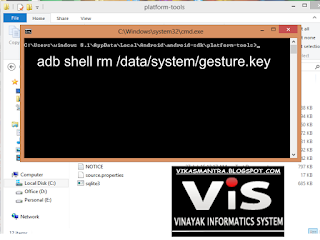
If above command is not working then put:
adb shell rm /data/system/gesture.key
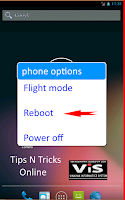
4.After that reboot your Mobile.
That's it.....
your will found that your mobiles pattern lock as been disabled and no data has been loosed
due to Unlocking process!!


this is very nice post and this is very good information about the seo digital marketing is achieve the good economical level in so many number of business industries.thanks for updating this information to us.
ReplyDeleteHadoop Training in Chennai
Good post.
ReplyDeleteRouter Login not working
routerlogin admin page
Routerlogin
Routerlogin Net
Thank you so much for your generosity and for such a professional job! I had heard about your excellent work and performance, but today I was honored to experience it
ReplyDeletecheapest & best dental implants in madipakkam
This post is genuinely incredible. I really like this post. It is remarkable among different posts that I ve read in a long time. You shake for this alright post. I genuinely welcome it! screen lock bypass
ReplyDelete